> ## Documentation Index
> Fetch the complete documentation index at: https://docs.qiton.app/llms.txt
> Use this file to discover all available pages before exploring further.
# Sharing
> Divide and conquer
As a coach, you might want to share your account with your players without disclosing your password and administrator
privileges.
Subaccounts make this possible now.
## Prerequisites
* An account
## Steps
Start by going to the settings page at [qiton.app/settings](https://qiton.app/settings).
## Create subaccount
 After clicking on the **Create subaccount** button, you will be prompted to fill in the email of your new user.
For security reasons, the password is automatically generated.
After clicking on the **Create subaccount** button, you will be prompted to fill in the email of your new user.
For security reasons, the password is automatically generated.
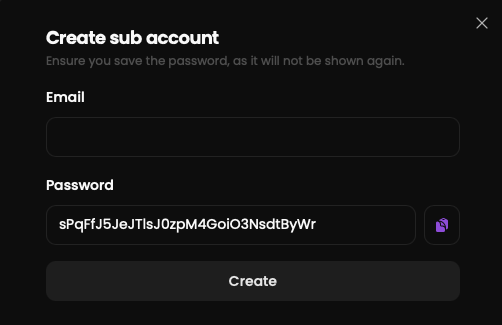 Share the credentials with your user.
## Permissions
A subaccount can perform any task that a regular user can do, except for:
* `Manage subscriptions`
* `Manage subaccounts`
* `Modify the GRID.GG token`
* `Modify the team owner`
* `Modify the Metrics`
* `Reset a match`
Share the credentials with your user.
## Permissions
A subaccount can perform any task that a regular user can do, except for:
* `Manage subscriptions`
* `Manage subaccounts`
* `Modify the GRID.GG token`
* `Modify the team owner`
* `Modify the Metrics`
* `Reset a match`