> ## Documentation Index
> Fetch the complete documentation index at: https://docs.qiton.app/llms.txt
> Use this file to discover all available pages before exploring further.
# Attack speed
> Adapt your play to the map
Determine your aggressive play by understanding if the selected map is suitable for fast or durable actions.
## Prerequisites
* An active account ([learn more](/get-started/setup))
* You have to select a map beforehand ([learn more](/core/map/root))
## Steps
Navigate to the **Overview** tab.
## Preview
 ## Available statistics
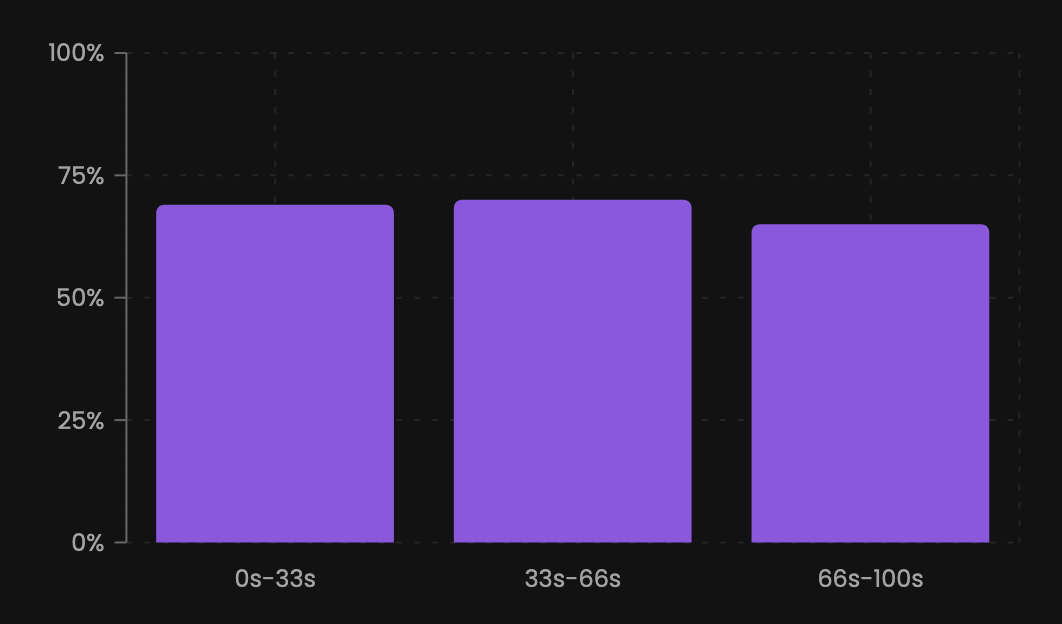
* `Wins percentage when planting between 0 and 33 seconds`
* `Wins percentage when planting between 33 and 66 seconds`
* `Wins percentage when planting between 66 and 100 seconds`
## Available filters
* `Dates`
* `Scrims`
* `Officials`
* `Tournaments`
* `Teams`
## Available statistics
* `Wins percentage when planting between 0 and 33 seconds`
* `Wins percentage when planting between 33 and 66 seconds`
* `Wins percentage when planting between 66 and 100 seconds`
## Available filters
* `Dates`
* `Scrims`
* `Officials`
* `Tournaments`
* `Teams`