> ## Documentation Index
> Fetch the complete documentation index at: https://docs.qiton.app/llms.txt
> Use this file to discover all available pages before exploring further.
# Summary
> Selected map
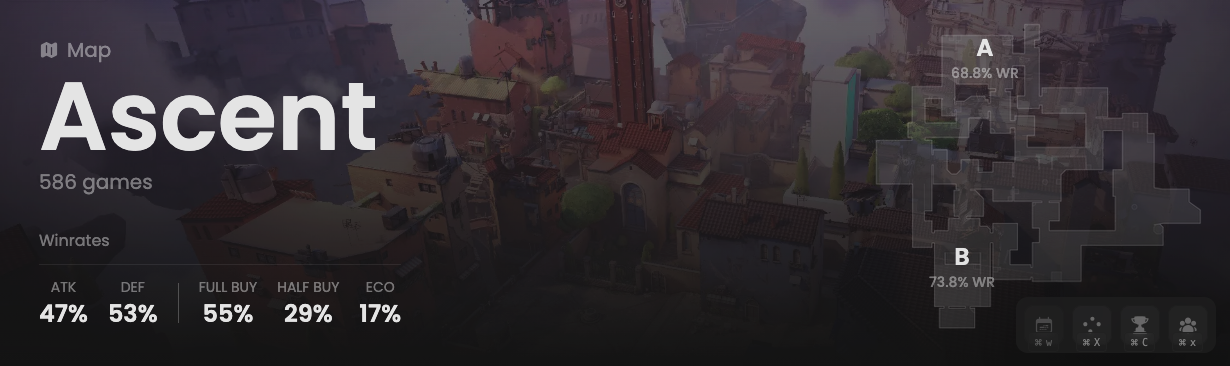
This header provides global data about all matches played on this map.
This allows you to determine, for instance, if the attacking side has an advantage over the defending one.
## Prerequisites
* An active account ([learn more](/get-started/setup))
* You have to select a map beforehand ([learn more](/core/map/root))
## Preview
 ## Available statistics
* `Map name`
* `Total number of sub-matches played`
* `Attacking wins percentage (per round)`
* `Defending wins percentage (per round)`
* `Wins percentage of full buy (per round)`
* `Wins percentage of half buy (per round)`
* `Wins percentage of eco (per round)`
* `Wins percentage when planting per side`
## Available statistics
* `Map name`
* `Total number of sub-matches played`
* `Attacking wins percentage (per round)`
* `Defending wins percentage (per round)`
* `Wins percentage of full buy (per round)`
* `Wins percentage of half buy (per round)`
* `Wins percentage of eco (per round)`
* `Wins percentage when planting per side`