> ## Documentation Index
> Fetch the complete documentation index at: https://docs.qiton.app/llms.txt
> Use this file to discover all available pages before exploring further.
# Summary
> Selected player
We provide access to the player summary, including his or her name, team and role.
Additionally, we compute several metrics scores for each role to analyze their impact.
## Prerequisites
* An active account ([learn more](/get-started/setup))
* You have to select a player beforehand ([learn more](/core/player/root))
## Preview
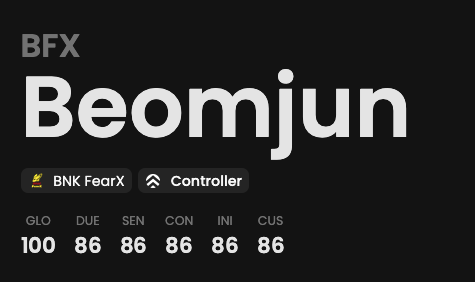 *Random values.*
## Available statistics
* `Metrics with Global preset`
* `Metrics with Duelist preset`
* `Metrics with Sentinel preset`
* `Metrics with Controller preset`
* `Metrics with Initiator preset`
Descriptions are available [here](/core/statistics-meaning).
## Metrics
Each Metrics score displayed on this page is calculated through the following steps.
1. We calculate a Metrics score by considering **the selected preset** and the average statistics of **the selected
player**.
Learn more [here](/core/metrics).
*Random values.*
## Available statistics
* `Metrics with Global preset`
* `Metrics with Duelist preset`
* `Metrics with Sentinel preset`
* `Metrics with Controller preset`
* `Metrics with Initiator preset`
Descriptions are available [here](/core/statistics-meaning).
## Metrics
Each Metrics score displayed on this page is calculated through the following steps.
1. We calculate a Metrics score by considering **the selected preset** and the average statistics of **the selected
player**.
Learn more [here](/core/metrics).