> ## Documentation Index
> Fetch the complete documentation index at: https://docs.qiton.app/llms.txt
> Use this file to discover all available pages before exploring further.
# Import rate
> See how many matches are imported
When we say "matches", we mean both Officials and Scrims.
## Prerequisites
* An active account ([learn more](/get-started/setup))
## Success rate
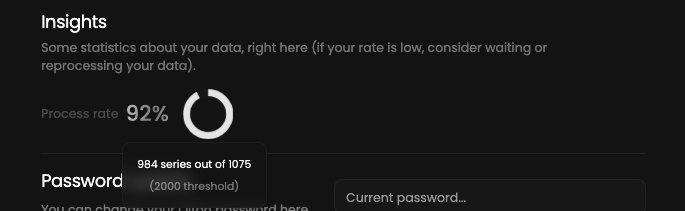
Our system is designed to import your last 100 matches from GRID.GG every 30 minutes.
Sometimes errors can occur due to various reasons.
That's why we have a settings section to show you how many matches were successfully imported.
Please go to the settings page [here](https://qiton.app/settings).
You will see some statistics like below.
 ## Why my success rate is low ?
Usually it means that our system is currently processing your matches.
Please wait a few hours and refresh the page.
If the success rate is still low, please [contact us](/miscellaneous/support).
## Why my success rate is low ?
Usually it means that our system is currently processing your matches.
Please wait a few hours and refresh the page.
If the success rate is still low, please [contact us](/miscellaneous/support).